Unity Grass Spawner
Unity Grass Spawner
Documentation
Overview
Stylized, interactive grass built for WebGL and mobile first, with PC features you switch on. Works in URP (forward, cast + receive shadows, depth, depth-normals) and Built-in (forward, shadow casting).
- Baked static chunk meshes: one or two draw calls per chunk, zero per-frame CPU for the grass itself.
- No compute shaders, no GPU instancing, no geometry shaders. Single alpha-clipped pass.
- Wind, camera-facing, distance fade, interaction, trails and shading all run in the vertex shader.
- Everything is edited on one component with Scene-view handles and live preview. Fields that don't apply to the current mode are hidden.
Requirements
Unity 6000.x. URP 17 is optional and auto-detected through the RenderPipeline SubShader tag. The UGUI package is needed by FpsDisplay and GrassRuntimeUI.
The package folder can be moved or renamed: nothing in the code depends on its path.
Quick start
- GameObject > 3D Object > Grass Field. A spawner appears with the default material and blade texture.
- Set Area (drag the edge handles, or switch to Spline and drag points), set Density, click Rebuild Grass.
- Add a Grass Interactor to anything that should push grass (player, ball). Drive it with TweenPosition for a quick demo.
- Pick a quality preset with the two buttons at the bottom of the inspector:
- Mobile / WebGL (default): 40k blades, 1 segment, unlit, no shadows, short culling.
- PC: 250k blades, 2 segments, lit, cast + receive shadows, long culling, 512 trample map.
- Decide on Build On Start:
- On: grass is rebuilt when the scene starts. The editor preview is temporary but is restored automatically after Play mode or a scene reload.
- Off: click Rebuild in the editor and the grass is baked into the scene (chunks saved, meshes stored in the package's
Bakedfolder). Zero load-time cost, deterministic in builds.
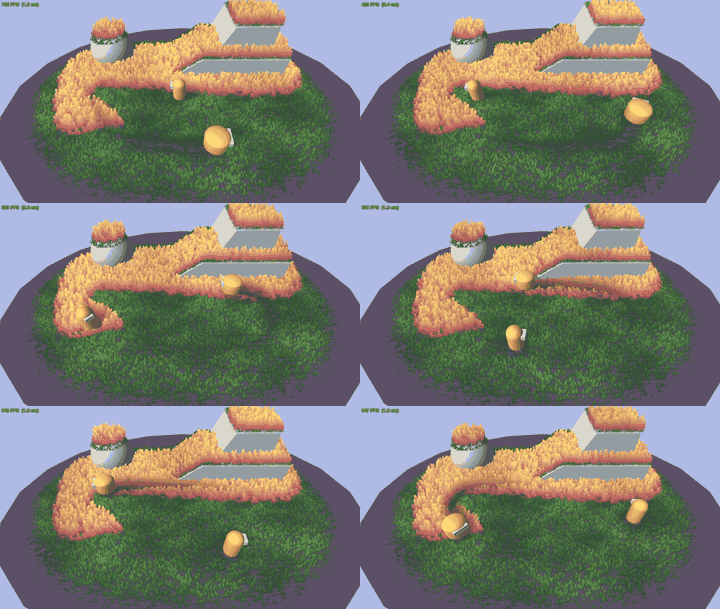
The Demo scene shows two fields on a platform and a boulder, two movers with interactors, the FPS overlay, the runtime toggle panel and the parallax camera.
GrassSpawner reference (inspector order)
Input
| Field | Meaning |
|---|---|
| Blade Texture | PNG whose alpha is the blade shape. White silhouettes work best. Enable Alpha Is Transparency on the import settings to avoid dark fringes (the shader also un-premultiplies as a safety net). |
| Tint Map | Optional texture spread over the area bounds; multiplies the grass color (dry patches, paths). |
| Tint Map Tiling / Offset | Repeats across the area (set the texture to Repeat for tiling above 1) and shifts it. |
| Tint Map Color | Multiplied into the map: recolor a grayscale mask without editing the texture. |
| Tint Map Strength / Blur | Strength blends toward white; blur samples a higher mip level (needs mipmaps). |
| Base Material | Only the shader is taken from it. Every look setting lives on the spawner. |
Area
| Field | Meaning |
|---|---|
| Area Shape | Rectangle (drag the four edge handles) or Spline (closed Catmull-Rom through the points; Shift+click the curve to add, Ctrl/Cmd+click a point to remove). |
| Area Size | Rectangle size, centered on the transform. |
| Spline Points / Smoothness | Control points in local XZ; 0 = straight polygon, 1 = fully smooth. Reset buttons for a rectangle or a circle. |
| Edge Falloff / Edge Density / Edge Height | Soft boundary: over this width the density fades to Edge Density and blades shrink to Edge Height. 0 = hard edge. |
Color
Color is defined on the spawner, not on the material.
| Field | Meaning |
|---|---|
| Color Mode | Gradient (root to tip) or Solid. The gradient is baked into a 64x1 ramp texture; changes preview instantly. |
| Gradient Mode | BladeHeight: the ramp follows real height, so short blades stay in root colors and the field reads as one surface. CardUV: every card runs root to tip over its own length (Zelda style). |
| Use Texture Color | Multiply the PNG's RGB in. Off by default so pre-shaded sprites don't bake their shadows into every blade. |
Ground Blend
| Field | Meaning |
|---|---|
| Blend To Ground | Fades the base of each blade into the ground so roots don't draw a hard line on the terrain. |
| Ground Blend Mode | AlphaFade: the root becomes fully transparent (alpha 0) with a per-pixel noise dither, still one cutout pass. Color: at Rebuild the surface under each blade is sampled (material color x texture when readable, terrain layers weighted by paint) and baked into the mesh (+4 bytes per vertex), so every patch of ground gets its own root color. Rebuild after changing ground materials or terrain paint. |
| Ground Blend Height / Strength | How far up the ramp the blend reaches, and how strong it is. |
Shading
Per-blade variation, light influence (0 = flat colors, 1 = fully follows the main light color, intensity and scene ambient), wind highlight, trample darkening. Only used when Affected By Lighting is on (except variation and trample darkening).
View
| Field | Meaning |
|---|---|
| Optimize For Perspective | Cards align to the camera view direction as one plane (no per-blade swivel) and lean away from a camera looking down. One card per blade is enough, so Cross Quads is ignored while on. |
Wind
Direction on XZ, strength, speed, spatial frequency. Motion has a per-blade random phase; shading uses a coherent wave so light bands travel smoothly across the field.
Interaction
| Field | Meaning |
|---|---|
| Push Strength | How far interactors push blades aside. |
| Trample Recovery | A small render texture per spawner remembers where interactors passed; grass stays flat and springs back over Recovery Time. One cheap blit per frame, skipped when idle or off-screen. Each interactor can scale the recovery time. |
| Trample Map Resolution | Default 256. Needs Rebuild to change. |
Density
Blades per square meter, a hard cap, and a seed.
Density Mask
| Field | Meaning |
|---|---|
| Density Mask | Texture over the area bounds; the chosen channel (with optional invert) scales local density. Needs Read/Write enabled. |
| Use Terrain Layer | When the ground is a Unity Terrain, the weight of one paint layer scales density (index + influence). |
Lighting
| Field | Meaning |
|---|---|
| Affected By Lighting | Off by default (unlit, colors exactly as set). On: main light direction, color, intensity and scene ambient shade the grass per vertex. |
| Cast Shadows | ShadowCaster pass (URP and Built-in). One extra pass per cascade; the PC preset turns it on. |
| Receive Shadows / Shadow Strength | URP only. One main-light shadow tap per vertex. Not compatible with the Screen Space Shadows renderer feature. |
Blade Shape
| Field | Meaning |
|---|---|
| Height Range / Width Range | Random per blade. |
| Cross Quads | Two cards at 90 degrees per blade. Ignored while Optimize For Perspective is on. |
| Segments | Vertical subdivisions per card; 1 is cheapest, 2-3 bend more smoothly. |
Ground
Raycast down onto Ground Layers from Raycast Height; blades sit on whatever they hit (terrain, meshes, props). Steeper than Max Slope is skipped. No hit = spawner plane.
Chunking and Camera Culling
| Field | Meaning |
|---|---|
| Chunk Size | Chunk edge in meters. Smaller = finer culling, more draw calls. |
| Camera Culling | Per frame: hide chunks outside the frustum or beyond Max Distance (blades shrink into the ground over Fade Range so nothing pops), and drop the detail half of chunks beyond Detail Distance (density LOD). Culling Camera empty = Camera.main. |
Runtime
| Field | Meaning |
|---|---|
| Build On Start | See Quick start. Off = baked into the scene. |
Other components
GrassInteractor - a sphere that pushes grass. Radius, Offset, Strength (how flat), Recovery Scale (multiplies the spawner's Recovery Time; heavy objects leave longer trails). Up to 8 active at once.
GrassRuntimeUI (Utils) - runtime toggle panel (UGUI) to compare cost on device: lighting, cast / receive shadows, perspective, wind, ground blend, trample recovery, plus a camera section (mouse parallax, drag to orbit, scroll to zoom) when a CameraParallax exists. Creates its own canvas and EventSystem if needed.
TweenPosition (Utils) - moves a Transform along a closed or open spline at constant speed; Local or World space points, Loop or PingPong, duration per lap, scene-view handles, kinematic rigidbody support.
TweenRotation (Utils) - loops a rotation around an axis with quaternions (no Euler drift): Spin (one turn per Duration) or PingPong (swing between -Angle and +Angle), Local or World axis, optional easing.
CameraParallax (Utils) - mouse / touch parallax around a focus point (Offset or Orbit mode), drag to orbit (yaw and pitch toggles, elevation limits, ignores drags that start on UI), mouse-wheel / pinch dolly zoom.
FpsDisplay (Utils) - FPS and frame time on a UGUI Text, optional grass stats.
Performance notes
- Budget: 30k-60k blades for WebGL / mid mobile, 200k+ on PC. The inspector shows vertex count and GPU MB before you build.
- Each vertex is 36 bytes (40 with baked ground colors); a blade is 4 vertices (1 segment, 1 card). Cross quads double it; each extra segment adds 2 vertices per card.
- Chunk culling is per renderer; keep chunks around 10-20 m for a good culling / draw-call balance.
- Many spawners cost nothing extra per frame beyond their own chunks: shader globals are uploaded once, trample blits are skipped when nothing changed.
- Baked mode keeps a CPU copy of the meshes (needed for serialization); preview / Build On Start mode frees it after upload.
- Dynamic batching is disabled on the shader on purpose: blades are rebuilt from object-space data.
Known limitations
- Received shadows are URP only and per vertex; Built-in receives none. Only the main directional light lights the grass.
- No HDRP SubShader.
- Textures used as Density Mask must be readable; they are sampled on the CPU at build time only.
- Recovery time per trail is capped at 60 s.
- The AlphaFade ground blend is a dither: visible as fine grain very close up; MSAA smooths it.
Download
Click download now to get access to the following files:
Leave a comment
Log in with itch.io to leave a comment.